
Threshold and Zone Settings
For accurate training data, make sure your Threshold Values and MyProCoach Training Zones (pace, power, heart rate) are correctly entered in your TrainingPeaks settings.
See: Getting Started with Training Zones
Planned Training Stress Score (TSS)
TrainingPeaks uses your thresholds to calculate a planned TSS for each workout based on its duration and intensity.
Completed Training Stress Score (TSS)
After your workout syncs, TrainingPeaks calculates completed TSS using the best available data:
Swim
Primary: Swim pace (sTSS)
Backup: Heart rate (hrTSS)
Bike
Primary: Power (TSS)
Backup: Heart rate (hrTSS)
Run
Primary: Power (TSS)
Backup: Pace (rTSS)
If no power or pace: Heart rate (hrTSS)
Ensuring Accurate Completed TSS
To keep your completed TSS aligned with your planned TSS:
Update your thresholds for all measures you use.
Check that TrainingPeaks is calculating TSS using your preferred method.
If completed TSS looks unusually high or low, TrainingPeaks may have defaulted to a measure that’s outdated or not your preference.
Example:
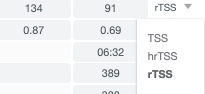
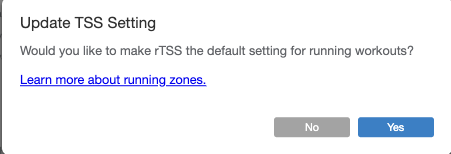
If your device records run power but you train by pace, open the completed workout, switch the TSS type to rTSS, and set it as your default.
If you need help updating thresholds or reviewing TSS settings, feel free to contact our coach support team.
Copyright MyProCoach® Ltd © December 2021. All rights reserved.
Comments
0 comments
Please sign in to leave a comment.